Turn Serviceand Support Dataand Context IntoActionableImprovements
Analyze thousands of incidents, requests, and service interactions to uncover root causes, operational bottlenecks, and high-impact opportunities for cost reduction, automation, and service improvement.
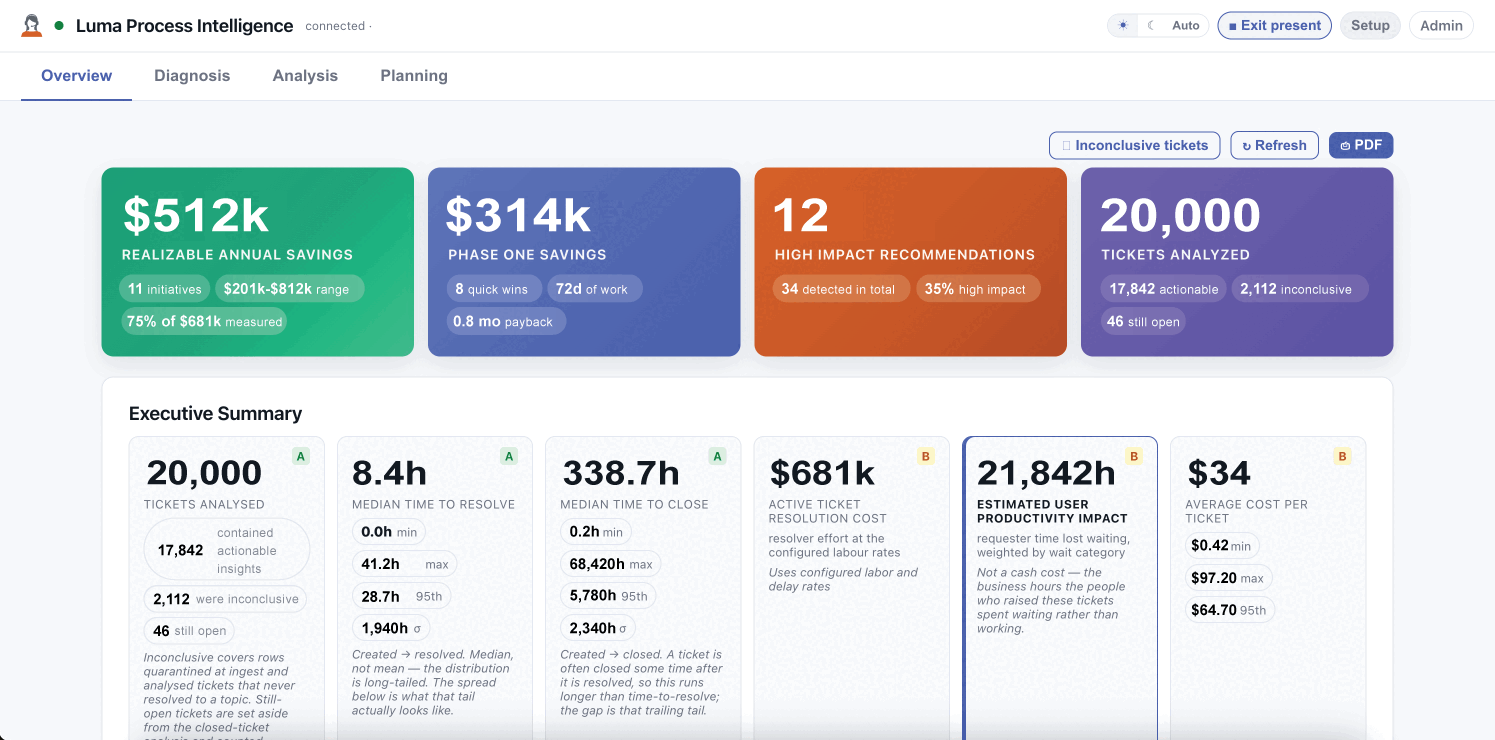
Find what is slowing teams down, driving avoidable costs, and impacting user experience without weeks of manual analysis.
Explore the Diagnostic Agent in Action.
Walk through how the Diagnostic Agent turns service activity into clear findings, supporting evidence, and prioritized opportunities for improvement.
.png)
A Dashboard Shows What Happened.The Diagnostic Agent Reveals What’s Behind It.

The metric is visible. The delay is not.


Surface wait states, repeated follow-ups, and handoffs.

Volume alone does not explain the effort.

See repeat work, high-touch requests, and turnaround patterns.

Patterns remain scattered across separate tickets.

Bring recurring issues, knowledge gaps, and process friction together.
Get Clear Visibility Into What the Metrics Can’t Explain.
Launch an analysis of tickets and service signals to surface patterns a periodic report can easily miss.

Recurring requests, issue clusters, and escalation signals.

Queues, wait states, reassignments, and handoffs.

See effort, turnaround, repeat touches, and missing information in one diagnostic view.
- Ticket patterns
- Resolution history
- Queue movement
- Knowledge signals
- Workload patterns
The Diagnostic Agent examines where time, effort, and information break down across service delivery.
See Where Time Goes—and What Improvement Is Worth.
Translate diagnostic findings into a measurable view of labor, capacity, cost, and the improvements worth prioritizing.
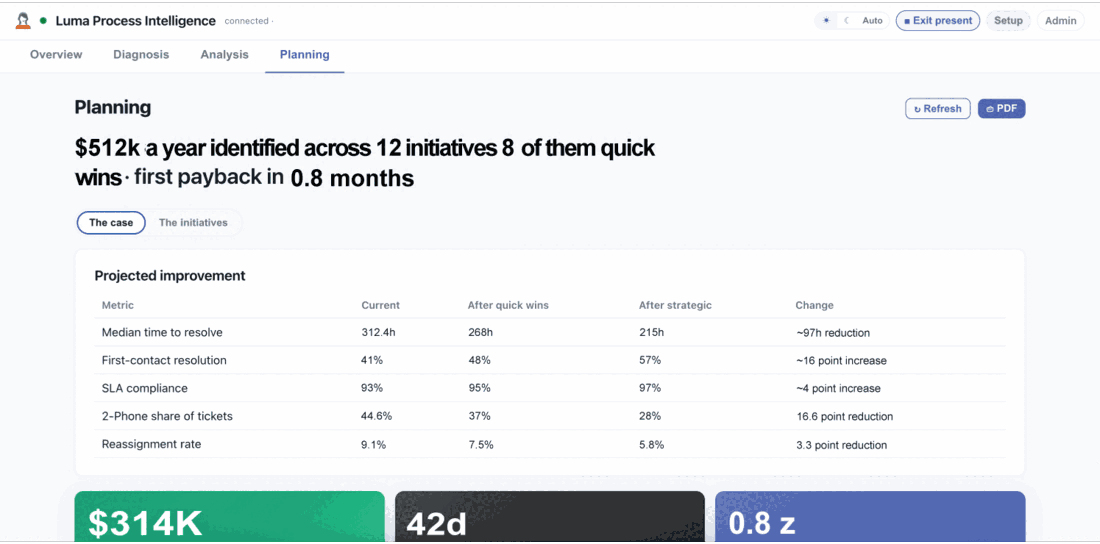

Separate productive work from hours consumed by queues, dependencies, repeated touches, and preventable follow-up.

Connect labor and process effort to the true cost of resolving different work.

Compare workload, turnaround, and the value each role or team contributes to the outcome.

See which request types, services, and teams absorb the most effort—and where capacity could be rebalanced.

Compare quick wins and strategic initiatives by effort, savings, and time to value.

See how selected changes could affect resolution time, SLA performance, and cost.
Resolved Doesn’t Mean Efficient.
The Diagnostic Agent reveals the delays, repeat effort, and hidden cost behind a closed ticket—then shows where to improve the next one.
Status: Resolved · Outcome: Delayed and high-effort
- ✕Incomplete intake triggered follow-up
- ✕Ownership shifted between queues
- ✕Missing guidance slowed analyst work
- ✕Repeated touches increased ticket cost
Improvements applied: intake + ownership + knowledge
- ✓Required context captured up front
- ✓Clear ownership reduces handoffs
- ✓Knowledge is available in the workflow
- ✓Fewer touches move work forward

Find where absent, outdated, or hard-to-find information repeatedly delays work.

Spot requests that trigger avoidable clarification and follow-up.

See where work stalls or changes ownership without moving closer to resolution.
Know What Deserves Attention Next.
The Diagnostic Agent helps teams move from what is happening to why it is happening—and toward a practical place to begin improving.
Detect recurring signals across tickets and the broader service environment.
Bring delay, workload, handoffs, and missing knowledge into context.
Surface practical opportunities and the evidence behind them.
Your team selects the action, owner, and process that fit the finding.
Keep watching to understand how service friction changes over time.
The pattern appears across request histories, queue transitions, and resolution notes.


Findings surface with the signals and service context behind them.

Teams review what the agent found before deciding what should change.

Owners, approvals, and formal workflows remain under your control.
Your Questions.Clear Answers.
How is the Diagnostic Agent different from a dashboard?
Dashboards summarize selected metrics. The Diagnostic Agent examines service activity for patterns, contributing factors, and practical improvement opportunities—helping teams understand what is happening and why.
What service information can it analyze?
It analyzes service tickets and the surrounding service environment to uncover recurring issues, delays, handoff friction, workload patterns, missing knowledge, and cost-saving opportunities. Available sources and history depth can be confirmed during scoping.
How does it assess workload and contribution?
It compares workload, turnaround time, reassignment, repeat effort, and resolution outcomes to show where analyst time is spent and how roles or teams contribute. The exact measures can be aligned to your service environment.
Does it make changes automatically?
No. The Diagnostic Agent surfaces findings and improvement opportunities; your team decides what to change and follows its established review and approval process.
Can findings support change or compliance work?
Yes. Findings can help inform formal change or compliance workflows by giving teams supporting context, recurring patterns, and evidence to review. Available integrations and governance controls can be confirmed during scoping.
One Diagnostic Agent.A Clearer View.
Bring diagnostic intelligence to your service operation with a commercial model shaped to your environment.
On-demand analysis of connected service data
Resolution friction and recurring-work insight
Workload, turnaround, and operational trend context
Improvement opportunities with supporting evidence
See ServiceOperationsMore Clearly.
Talk with our team about the signals you want to understand, the service friction you want to reduce, and where diagnostic insight could help you focus next.